Good Afternoon. My name is Manuel and I run ManyProgramming™. Today I have got a start-up on what “int”, “float” and “str” is on Python. I hope you enjoy and continue following me!
“int” standing for Integer is a whole number! E.g. 1, 2, 3, 4,000… We You usually use them as variables e.g. x=1, y=100, z=1000…
If, on Python, you do this:
>>> x=1
>>> type (x)
<class ‘int’>
>>> print (x)
1
You can even use Python as a pocket calculator very easily. For Example,
>>> 3*x-1
2
Next, I will define more variables.
>>> a=2
>>> b=3
>>> c=4
Now I have defined 4 Variables as Integers. “x=1”, “a=2”, “b=3” & “c=4”.
>>> a*b*c*x-a-b-c-x
18
This can be used very flexibly and some people even use it as a calculator. This is a bit random but you are able just to do this:
>>> 195*195
WARNING! When using multiply than you have to use * instead of x. Same with division. You need to use / instead of the normal one you use on normal calculators!
This, with the colours work on IDLE versions of Python, when the background is white. The “x=1” doesn’t have to be a 1 but I did it because I have just written on integers!
“float” standing for Floating Number is a decimal number! E.g. 1.5, 1.6…
Similar to the string and the integers the floating number is often used in a variable e.g. x=1.5, y=1.6…
If in Python you do this:
>>> z=1.5
>>> type (z)
<class ‘float’>
“str” standing for String is a sequence of characters! E.g. Hello, World, Mum…
We usually use them when defining worded meanings
E.g. x=”Hello World”, y=”my mum”…
>>> y=”Hello World”
>>> type (y)
<class ‘str’>
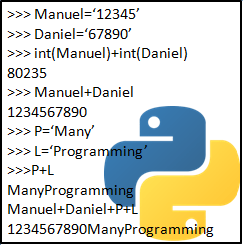
You can also put numbers as a string! e.g. “1000” is a string but 1000 without the inverted commas is an Integer. Now follow along as I teach you about how to change a string to an Integers.
>>> g=”12345″
This is a String.
>>> h=12345
This is an Integer. I will now overwrite ‘h’ to make it a string.
>>> h=”67890″
Now you are able to add strings. The two strings will extend instead of adding numerically! e.g. 123+456 (if it is a string) will be 123456. 123+456 (if it is an Integer) will be 579!
>>> g+h
1234567890
>>> int (g) + int (h)
80235
Yes, I know, you might look a little surprised but the concept is very simple. I have defined ‘g’ & ‘h’ as strings but here I changed them, only for this time, to an integer.
The ‘z’ and the ‘1.5’ can be replaced. The ‘z’ can be replaced by any letter but be careful because if the letter is the same as one you have used before. You could do it on purpose or you might accidentally do it. The ‘1.5’ can be replaced by using any other number; if you want a floating number than you should take a decimal number!
To change the class please follow what I will do next!
>>> x=”1″ This is an Integer (int)
>>> x=”Hello World” This is a String (str)
>>> x=”1.5″ This is a Floating Number (float)
Just change the variable to the chosen class by using the top three to adjust it!
You can even add strings!
>>> a=”abc”
>>> b=”xyz”
>>> a+b
‘abcxyz’
Thank you very much for listening to my first proper blog on Python. Hope you tune in for next weeks Friday! If you would like to see my Book Reviews blog than Click Here!
 ManyProgramming™
Amazing blog!!!!!!!!!!!!!!!!!
LikeLiked by 1 person
AMAZING BLOG AND ABSOLUTELY BRILLIANT IDEAS!!!!!
LikeLiked by 1 person